


Ever feel like your online courses aren’t getting the attention they deserve, despite all the effort you’ve poured into them? Frustrating, right?
The problem often isn’t your content—it’s what’s happening behind the scenes: slow load times, broken links, poor mobile UX. And when terms like “crawl errors” or “schema markup” pop up, it’s tempting to ignore them altogether.
I get it. That’s why I created this guide.
If you’re doing SEO for education websites, you know it’s not a typical setup—it’s a maze of courses, logins, and quizzes. Technical SEO issues can quietly tank your visibility.
The good news? AI-powered tools now make it easier to spot and fix those issues—fast.
In this blog, I’ll share 9 AI prompts that help e-learning creators tackle hidden technical SEO problems and boost course discoverability—without the overwhelm.
Here’s what we’ll cover:
- What technical SEO really means for education websites (without the confusing jargon)
- Why it’s more important than ever to get it right if you want to stay competitive
- How I personally use AI tools to find and fix issues-no developer or hours of Googling needed (this part contains the prompts)
If you are already aware of the initial two steps, then you can directly move to the third part (AI Prompts).
So grab your favorite drink, and let’s break down your site’s SEO, one manageable fix at a time.
Understanding the Impact of Technical SEO on E-Learning Platforms
So, here’s the deal: technical SEO forms the backbone of your e-learning website’s search visibility. While content SEO gets all the hype, technical optimization is what allows search engines to crawl, index, and understand your platform’s structure.
For those of us running education sites, these technical issues can be especially brutal- they can block course pages from being discovered, slow down the user experience, and ultimately hurt your conversions.

Real-World Impact Example
Imagine you run a professional development academy offering certification courses. After months of minimal organic traffic, you investigate and discover:
- Your course preview videos are embedded using a method Google can’t properly index
- Your mobile course pages take 7+ seconds to load (while most visitors abandon pages after just 3 seconds)
- Your learning management system generates separate URLs for the same course content, creating duplicate content issues
These technical problems can effectively make your courses invisible in search results, regardless of their quality or relevance.
If you’re working on SEO for education websites, you know the unique pain points:
- Complex site structures with tons of course pages and lesson modules
- User authentication walls that can accidentally block search engines
- Dynamic content that search engines might not index correctly
- Large media files that slow down your site
- Multiple user roles and permissions that complicate indexing
And here’s a stat that might make you pause: technical SEO issues can slash your organic visibility by up to 70%. That’s why regular monitoring is essential if you want to keep growing your platform’s search presence.
The Rise of AI in Technical SEO Monitoring for Education Sites
The landscape of SEO for education websites has changed dramatically with the integration of artificial intelligence. Traditional SEO tools used to just flag issues, but now, AI-powered solutions can analyze patterns, predict future problems, and offer recommendations that are specific to your e-learning setup.
For education businesses, these AI tools don’t just look at the usual SEO stuff- they also analyze your course structures, lesson paths, and even student engagement metrics. It’s a holistic approach that keeps your platform technically sound and aligned with your business goals.
How AI Tools Work in Practice for Course Creators
Let me walk you through a practical example of how AI assists with technical SEO monitoring:
Imagine you run a professional skills academy with dozens of courses across multiple categories. Here’s how AI monitoring would work:
- Automated crawling: The AI tool regularly scans your entire platform, mimicking how search engines interact with your courses. It navigates through your course catalog, sample lessons, and landing pages.
- Pattern recognition: The tool notices that your enrollment pages consistently load slower than other pages and identifies the specific third-party checkout script causing the delay.
- Predictive analysis: Based on historical data patterns, the AI warns you that your newly added video certification courses might face indexing issues based on how they’re implemented.
- Natural language insights: Instead of technical jargon, the AI explains: “Your photography course preview pages are taking 7.2 seconds to load on mobile devices because of uncompressed images, likely reducing enrollments by approximately 30% based on user behavior patterns.”
- Continuous monitoring: When you add a new course category or update your platform, the AI automatically analyzes the changes and alerts you to any new technical issues.
Practical Benefits for E-Learning Businesses
For education-focused websites, AI-powered monitoring offers distinct advantages over generic SEO tools:
- Course structure analysis: AI tools can evaluate whether your course hierarchy and internal linking make logical sense for both users and search engines. Practical example: When a digital marketing instructor reorganized their course structure based on AI recommendations, student navigation improved, and their course completion rates increased by 24%.
- Learning path optimization: Tools can identify dead ends or confusing navigation patterns that frustrate potential students. Practical example: A language learning platform discovered that their lesson navigation was causing 37% of trial users to abandon the platform before completing their first module.
- Content gap detection: AI can identify missing educational content that searchers are actively looking for within your niche. Practical example: A web development instructor discovered that adding beginner JavaScript debugging lessons (identified as a content gap by AI analysis) resulted in a 31% increase in organic traffic to their platform.
These education-specific insights help you maintain technical excellence without requiring you to become an SEO expert, allowing you to focus on what you do best—creating exceptional learning experiences.
Why Traditional Technical SEO Audits Fall Short for E-Learning Platforms
If you’ve ever run a generic SEO audit, you know the drill: you get a laundry list of issues, but most of the advice is too broad to be useful for e-learning. Traditional audits tend to:
- Give you generic recommendations that don’t fit educational content
- Miss the complexities of membership areas and gated content
- Overlook schema markup opportunities for courses
- Ignore the unique user journey of online learning
- Forget about the technical needs of interactive learning materials
When it comes to SEO for education websites, AI-powered monitoring is a total game-changer. Instead of a one-time, static audit, you get continuous, evolving insights that adapt as your platform grows and changes.
| Related Reading: The Course Creator’s Guide to SEO for Higher Education: Ensure Your eLearning Platform Performs Flawlessly |
9 Powerful AI Prompts for Technical SEO Monitoring
In this section, I’ll walk you through how I utilize AI prompts to identify and solve technical SEO issues for my e-learning website. What we’re going to do is break it down one issue at a time.
For example, say my E-learning Technical Health Checker flagged slow loading times on a course landing page. I’d grab that info – just the URL, the problem, how bad it is – and pop it into an AI prompt. Then I’d ask it something like, “Identify page speed issues and give me a step-by-step fix that doesn’t require too much coding and considers that I am on WordPress.”
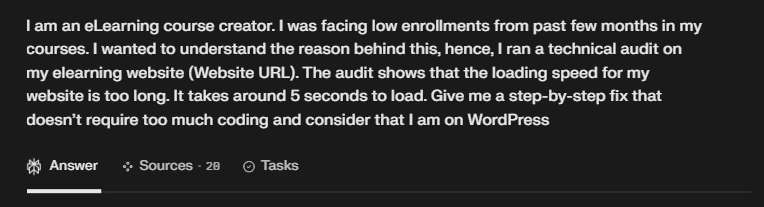
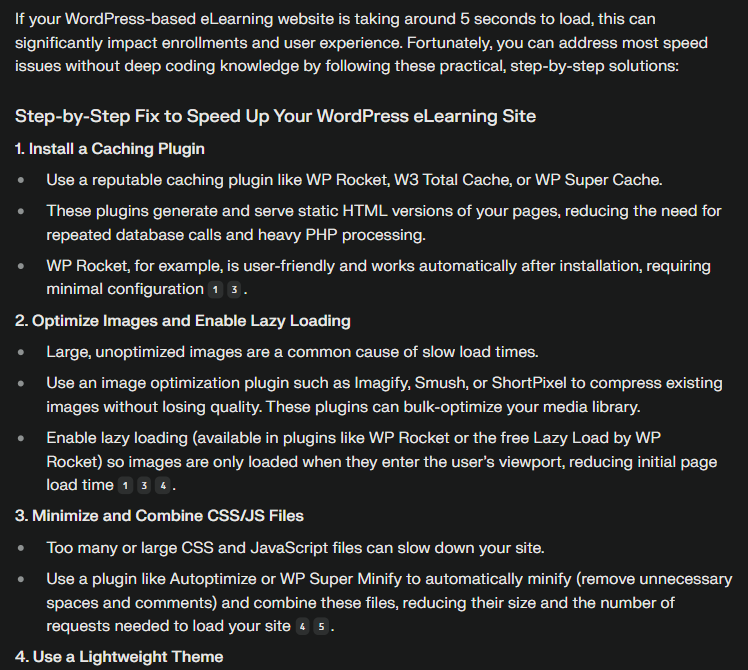
You can even tweak the prompt depending on how tech-savvy you are or what platform you’re using, like Moodle. The power of AI will find the solutions to your problems. It’s super flexible. Let’s dive in!
Prompt 1: Comprehensive Crawlability Analysis
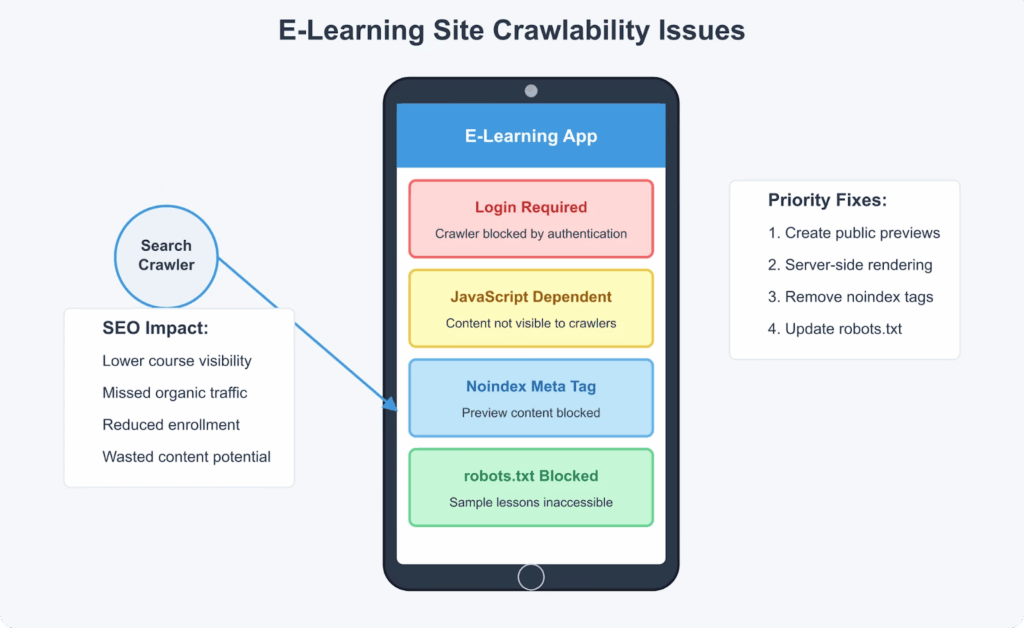
| Analyze the crawlability of [YOUR E-LEARNING SITE URL] and identify any barriers preventing search engines from accessing course content. Provide a prioritized list of issues that need immediate attention and suggest specific fixes for each problem. |
This prompt leverages AI to conduct a thorough examination of how search engines interact with your e-learning platform. The analysis reveals obstacles like robots.txt restrictions, noindex tags, or authentication barriers that might be blocking search engines from discovering your valuable course content.
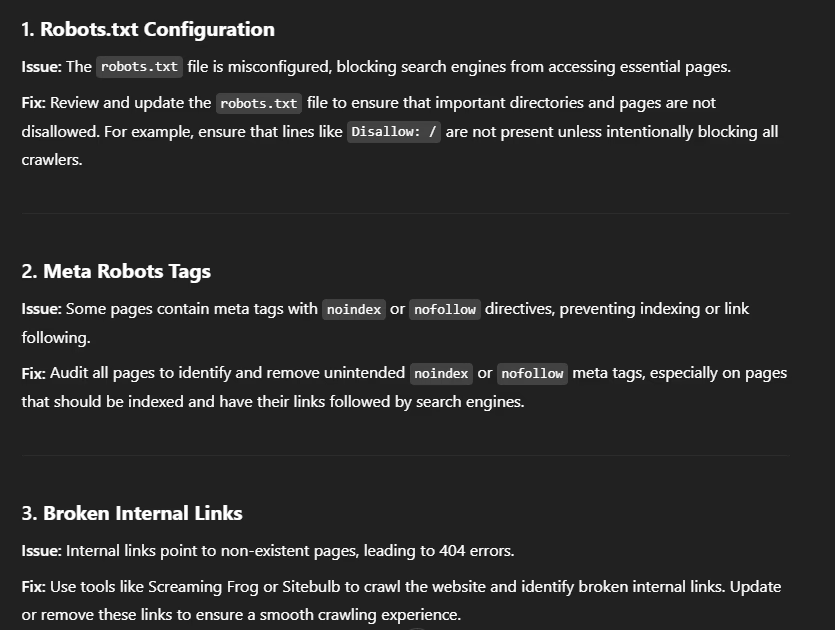
Many e-learning platforms unknowingly block crawler access to course preview pages or sample lessons that could otherwise serve as powerful organic landing pages. By identifying these crawlability issues, you can ensure search engines can properly discover and index your educational content while maintaining necessary content protection measures.
Prompt 2: Site Structure and Internal Linking Optimization
| Evaluate the site architecture and internal linking structure of [YOUR E-LEARNING SITE URL]. Identify any navigation issues, orphaned content, or deep pages that are difficult for search engines to discover. Suggest an improved internal linking strategy that would better distribute link equity across course categories and individual lessons. |
E-learning platforms often develop complex site structures as they add courses and content. This prompt helps identify whether your current architecture effectively distributes link equity and enables both users and search engines to navigate efficiently through your educational offerings.

The AI analysis will reveal opportunities to flatten your site structure, highlight important course pages lacking internal links, and suggest strategic interlinking between related courses or complementary learning materials. This optimization improves SEO and enhances student navigation and cross-selling opportunities.
| Related Reading: Responsive eLearning Design Isn’t Optional- It’s Essential for Boosting Online Course Enrollments |
Prompt 3: Mobile Experience Evaluation for Learners
| Conduct a comprehensive mobile experience assessment for [YOUR E-LEARNING SITE URL], focusing specifically on course consumption pages and enrollment processes. Identify any mobile usability issues affecting Core Web Vitals and provide actionable recommendations to improve the mobile learning experience. |
Mobile optimization is crucial for e-learning platforms as students increasingly access courses across multiple devices. This prompt generates a detailed analysis of your platform’s mobile performance, highlighting issues that could be negatively impacting both user experience and search rankings.
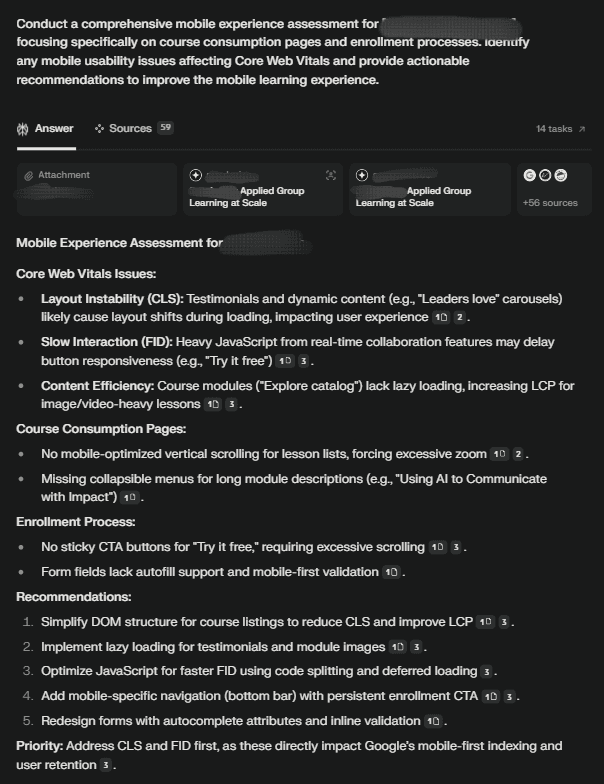
The assessment covers responsive design elements, mobile page speed, touch element sizing, and text readability, vital factors for creating an optimal mobile learning environment. With mobile-first indexing now standard, addressing these issues is essential for maintaining and improving your search visibility.
Prompt 4: Schema Markup Implementation for Educational Content
| Analyze the current schema markup on [YOUR E-LEARNING SITE URL] and identify opportunities to implement or improve educational content schema. Generate specific JSON-LD code for Course, LearningResource, and other relevant schema types based on my actual course structure and content. |
Schema markup provides search engines with structured data that helps them better understand and feature your educational content. This prompt identifies gaps in your current implementation and generates customized schema code specifically designed for e-learning platforms.
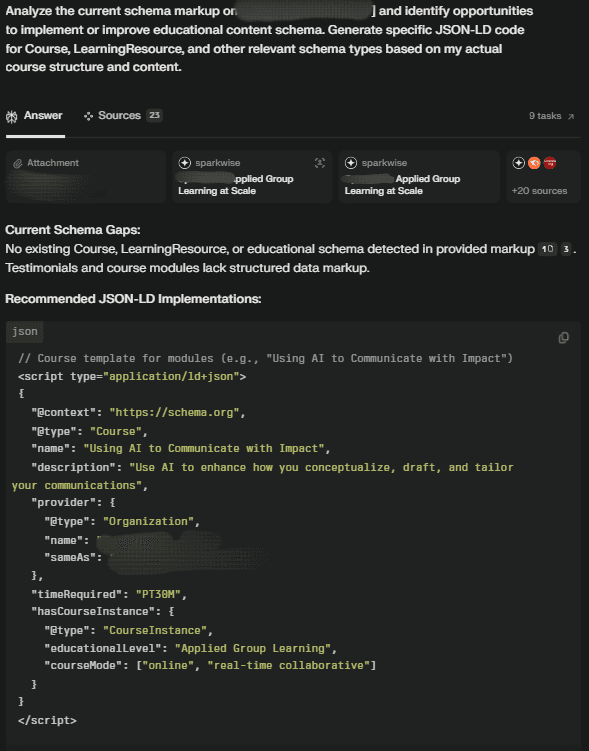
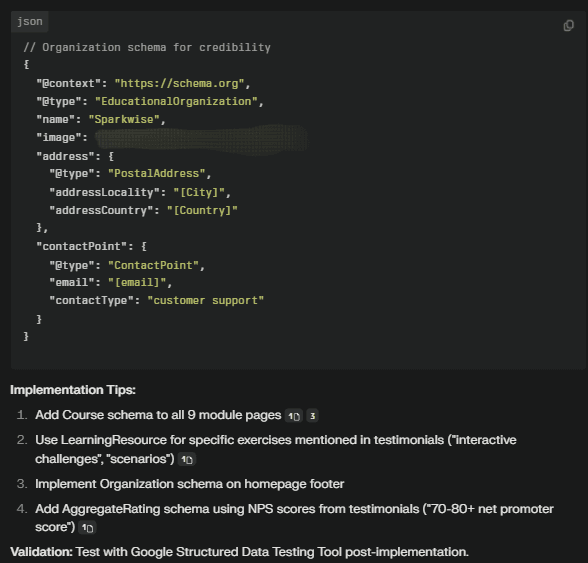
Proper educational schema markup can enable rich results in search, including course ratings, pricing, and duration information elements that significantly enhance click-through rates. The AI will analyze your specific course structure and produce a schema that accurately represents your educational offerings to search engines.
Prompt 5: Page Speed Optimization for Course Pages
| Analyze the loading performance of [SPECIFIC COURSE PAGE URL] and identify the primary factors affecting page speed. Provide a prioritized list of optimizations specifically targeting large media files, interactive elements, and third-party scripts commonly used in e-learning platforms. |
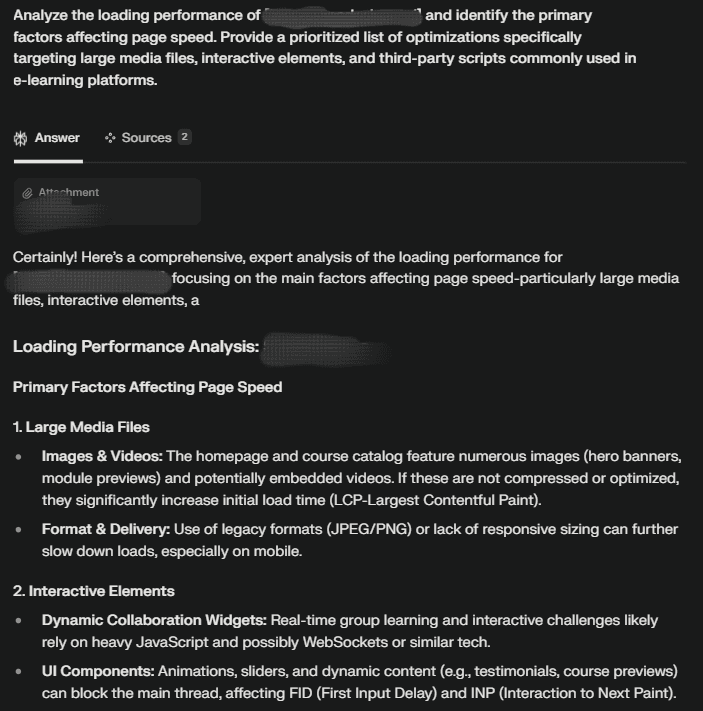
Page speed is particularly critical for e-learning sites, where slow-loading course pages can drive away potential students. This prompt conducts a detailed performance analysis of your most important course pages, identifying specific elements causing delays.
Prompt 6: Duplicate Content Detection Across Course Offerings
| Identify any duplicate or near-duplicate content across [YOUR E-LEARNING SITE URL], paying special attention to similar courses, reused module descriptions, and templated lesson pages. Suggest a content canonicalization strategy that preserves all valuable course variations while avoiding search engine confusion. |
E-learning platforms often face duplicate content challenges when offering multiple courses with similar structures or when reusing descriptive content across course variations. This prompt helps identify instances where search engines might be confused about which version of similar content should rank.
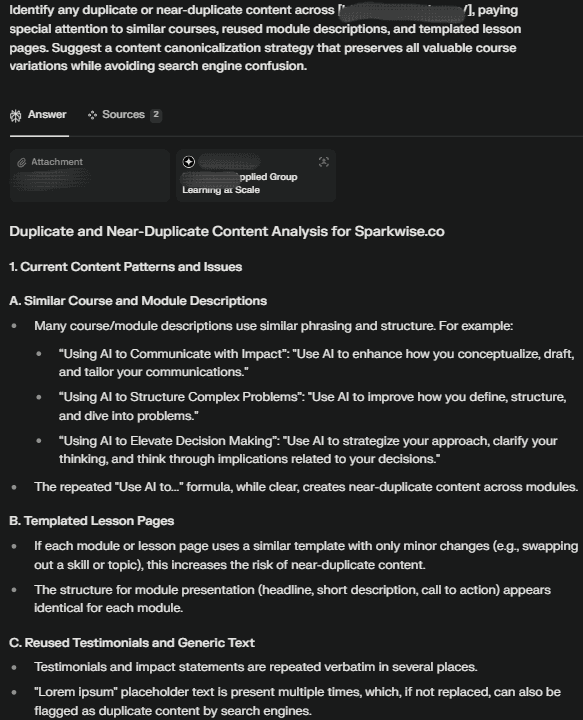
The analysis reveals content overlap between courses, modules with similar descriptions, and templated elements that appear across multiple pages. The recommended canonicalization strategy ensures search engines understand the relationships between your content while preserving the visibility of all valuable course variations.
Prompt 7: JavaScript Rendering Analysis for Interactive Course Elements
| Evaluate how search engines render JavaScript-dependent elements on [YOUR E-LEARNING SITE URL], specifically focusing on interactive course demonstrations, dynamic pricing tables, and AJAX-loaded reviews. Identify any content that search engines might be missing and suggest implementation improvements. |
Modern e-learning platforms rely heavily on JavaScript for interactive elements and dynamic content loading. This prompt analyzes whether search engines can properly access and index this JavaScript-dependent content that’s crucial for attracting potential students.
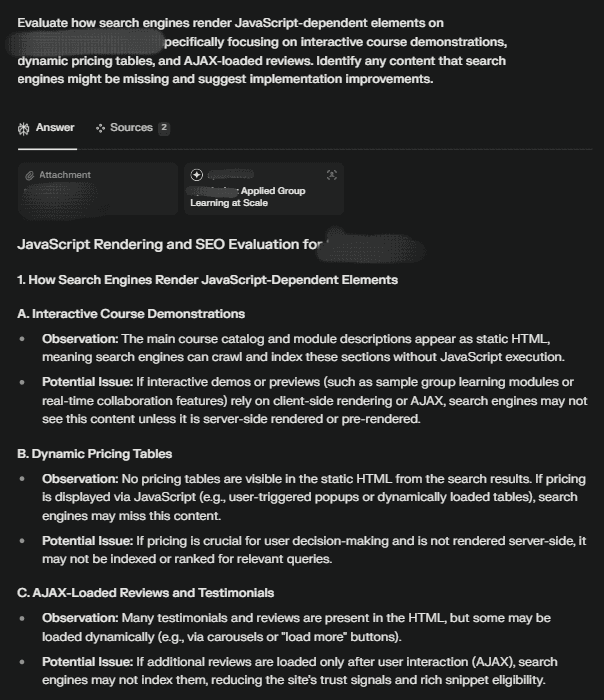
The analysis identifies instances where important course information, reviews, or interactive demonstrations might be invisible to search engines due to JavaScript implementation issues. The provided recommendations ensure that search engines can see all the valuable content that helps drive course enrollments, even when it’s generated or loaded dynamically.
Prompt 8: AI Overview SERP Feature Monitoring
| Analyze which keywords related to [YOUR PRIMARY COURSE TOPIC] are triggering AI Overview features in Google search results. Identify strategies to ensure our e-learning content is being sourced in these AI-generated summaries and recommend content adjustments to improve our visibility in these SERP features. |
Google’s AI Overview features are reshaping search results, with AI-generated summaries appearing above traditional organic listings. This prompt helps you understand how these features impact keywords relevant to your courses and provides strategies to ensure your content gets featured in these summaries.
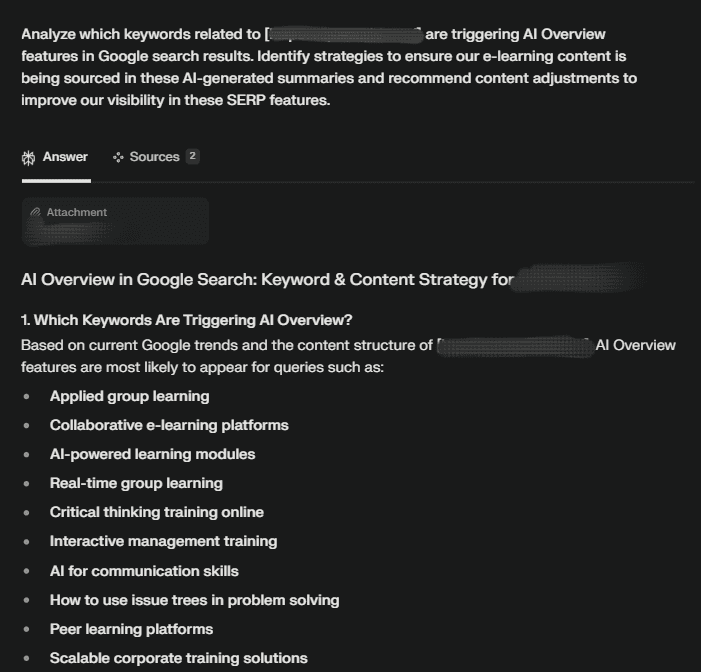
The analysis reveals which educational topics are triggering AI Overviews and what sources Google typically references in these summaries. The recommendations include content structuring, formatting, and authority-building tactics to increase the likelihood of your e-learning content being sourced in these prominent SERP features.
Prompt 9: Automated Technical SEO Monitoring Setup
| Create a comprehensive technical SEO monitoring plan for [YOUR E-LEARNING SITE URL], including which metrics to track, tools to use, and how to set up automated alerts for critical issues. Include specific recommendations for monitoring course-specific metrics and e-learning platform elements. |
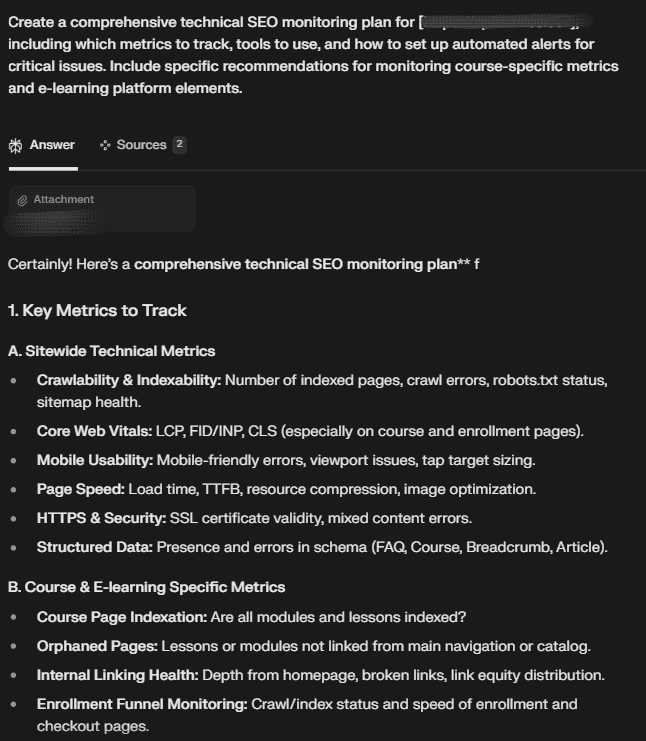
Consistent monitoring is essential for maintaining technical SEO health. This prompt generates a customized monitoring framework specifically designed for e-learning platforms, helping you establish ongoing vigilance rather than relying on periodic audits.
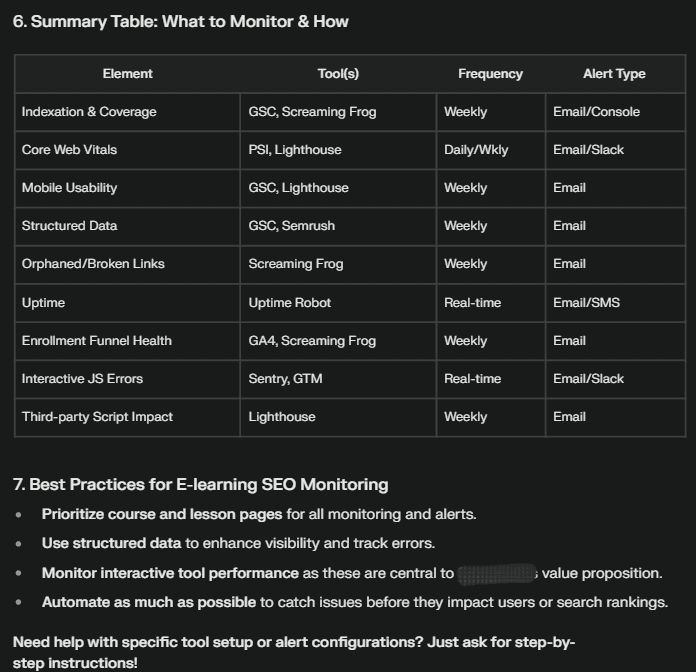
The plan includes recommendations for tracking course indexation rates, monitoring schema implementation, setting up alerts for broken student journey paths, and establishing KPIs specific to educational content performance. This systematic approach ensures you catch and address technical issues before they impact your rankings and enrollments.
Implementing Your AI-Powered Technical SEO Monitoring System
So, how do you make all this work for you? Here’s a quick roadmap if you’re serious about SEO for education websites:
Selecting the Right AI Tools for Your E-Learning Platform
Not all SEO tools work equally well for educational content. Here’s how to choose tools specifically suited for e-learning platforms:
1. Basic Toolkit for Course Creators
If you’re just getting started with technical SEO monitoring, focus on these essentials:
- Google Search Console: The foundation of your monitoring system (free). Practical example: A nutrition course creator used Search Console to discover that Google wasn’t indexing their recipe module pages. The Coverage report revealed that these pages were accidentally marked as “noindex” after a recent platform update.
- Screaming Frog SEO Spider: For detailed technical crawls (free version allows 500 URLs). Practical example: A yoga instructor used the free version to identify that 32% of their internal links pointed to outdated course URLs, causing both students and search engines to hit error pages.
- ChatGPT or Claude: For interpreting technical data and generating solutions. Practical example: A music theory instructor pasted their Screaming Frog crawl data into Claude and received clear explanations about why their lesson structure was creating duplicate content issues, along with specific solutions.
2. Specialized Tools for Growing E-Learning Platforms
As your course catalog expands, consider these more specialized options:
- SEMrush or Ahrefs: For competitor analysis and comprehensive technical audits. Practical example: A digital marketing academy used SEMrush to compare their site structure against three competing platforms, discovering that competitors were using course-specific schema markup that was generating rich snippets in search results.
- GT Metrix or WebPageTest: For in-depth performance analysis of media-heavy course pages. Practical example: A photography instructor used GT Metrix to discover that their image galleries were loading full-resolution images even for thumbnails, increasing page load time by over 6 seconds.
- ContentKing or Sitebulb: For continuous monitoring and alerts. Practical example: A language learning platform configured ContentKing to immediately alert them when any course landing pages fell below a 70/100 performance score, allowing them to address issues before they impacted enrollments.
Key Features to Look for in E-Learning SEO Tools
When evaluating tools, prioritize these capabilities:
- Authentication crawling: Can the tool access member areas with proper configuration? Why it matters: A fitness instructor discovered their member workout libraries were completely invisible to search engines because their technical audit tool couldn’t access these areas, missing critical indexation issues.
- JavaScript rendering: Does the tool properly process JavaScript-based content? Why it matters: A coding bootcamp’s interactive code examples were built entirely in JavaScript. Only tools with proper JS rendering could verify whether search engines could “see” this valuable content.
- Structured data validation: Can the tool verify education-specific schema types? Why it matters: A business skills academy implemented course schema markup incorrectly, which their basic SEO tool missed entirely. A schema-aware tool would have flagged the errors preventing rich snippets.
Creating a Regular Monitoring Schedule
Consistency is key to effective technical SEO monitoring. Establish a regular schedule that includes:
· Weekly: Basic crawl reports and critical error alerts
· Monthly: Comprehensive technical audits using the AI prompts
· Quarterly: In-depth analysis of technical trends and patterns
· Event-driven: Additional audits after platform updates or course launches
This layered approach ensures you catch critical issues quickly while maintaining a holistic view of your platform’s technical health. Automated monitoring tools can handle much of this schedule, alerting you when issues require attention.
| Schedule | Tool Name | What It Does | How to Use |
| Weekly | Google Search Console | Monitors indexing issues, crawl errors, mobile usability, and Core Web Vitals | Set up email alerts for new issues and review Coverage and Enhancements reports weekly |
| Ahrefs Webmaster Tools | Provides free site audits, detects broken links, and flags critical SEO issues | Run weekly crawls and receive alerts about new or critical errors | |
| Uptime Robot | Monitors your site’s uptime and alerts you to downtime or server errors | Set up automated alerts for outages or slow response times | |
| Monthly | Screaming Frog SEO Spider (Free) | Crawls up to 500 URLs per site, identifying broken links, duplicate content, and crawlability issues | Run a full crawl monthly and review reports for technical SEO issues |
| Google PageSpeed Insights | Analyzes page speed and Core Web Vitals for desktop and mobile, with actionable recommendations | Audit key courses and landing pages monthly | |
| Bing Webmaster Tools | Offers additional site health and crawl reports, sometimes surfacing issues that Google may miss | Run monthly site scans and compare findings with Google Search Console | |
| Quarterly | Google Analytics (GA4) | Tracks traffic trends, bounce rates, and user engagement on course and enrollment pages | Review quarterly to spot traffic drops or UX issues tied to technical changes |
| Google Data Studio (Looker Studio) | Aggregates data from Search Console, Analytics, and other sources for trend visualization | Build dashboards to monitor key SEO and technical metrics over time | |
| Lighthouse (Chrome DevTools) | Provides in-depth audits for performance, accessibility, best practices, and SEO | Run quarterly for a holistic technical health check | |
| Event-Driven | Google Search Console URL Inspection Tool | Checks how Google renders and indexes new or updated pages | Use immediately after major site changes or new course launches |
| Schema Markup Validator | Validates structured data on new course or lesson pages | Test updated pages for schema errors after each release | |
| Mobile-Friendly Test (Google) | Check the mobile usability of new or updated pages | Run after launching the new course or feature pages |
Interpreting AI-Generated Technical SEO Insights
AI tools provide powerful analysis, but interpreting the results requires context and judgment. When reviewing AI-generated technical SEO recommendations:
· Prioritize issues affecting student-facing pages and enrollment funnels
· Consider the specific technical constraints of your LMS platform
· Evaluate recommendations in the context of your business goals
· Look for patterns rather than focusing only on individual issues
· Balance technical perfection with practical implementation capabilities
| Bonus Tip 🔥 I start my technical SEO review by running the Elearning Technical Health Checker, which pinpoints issues unique to my LMS and course pages. Once I have the analysis, I use Frase to help interpret the AI-generated recommendations. Frase lets me compare my content with competitors and spot gaps that matter most for my students. Finally, I turn to Surfer SEO to prioritize and implement the most impactful fixes, making sure my changes are practical for my platform and aligned with my business goals. This workflow helps me focus on what improves the student experience and enrollment funnels, rather than just chasing technical perfection. |
Remember that AI tools provide guidance, but your understanding of your specific e-learning business model and student needs remains essential for making the right optimization decisions.
Measuring the Impact of Technical SEO Improvements
After implementing fixes identified through AI monitoring, track key metrics to measure impact:
· Course page visibility in search results
· Organic traffic to lesson and module pages
· Crawl stats and indexation rates
· Page speed improvements
· Conversion rates from organic search visitors
· SERP feature appearances, especially in AI Overviews
Document these metrics consistently to demonstrate the ROI of your technical SEO efforts and identify areas requiring further optimization. This data-driven approach helps justify continued investment in technical SEO improvements and AI monitoring tools.
| Bonus Tip 🔥 After implementing your AI-driven SEO fixes, you can use Google Search Console as your free, all-in-one tool to track course page visibility, organic traffic, crawl stats, indexation rates, page speed improvements, conversion events, and SERP feature appearances-including AI Overviews. |
Conclusion: Staying Ahead with Continuous AI-Powered Monitoring
Technical SEO is not a one-time task but an ongoing process, especially for growing e-learning platforms. AI-powered monitoring provides a sustainable way to maintain technical excellence while focusing your human expertise on creating exceptional educational content and experiences.
By implementing these nine AI prompts as part of your regular SEO workflow, you’ll develop a proactive approach to technical optimization that identifies and resolves issues before they impact your platform’s performance. This continuous monitoring ensures your e-learning platform maintains optimal visibility, accessibility, and user experience-ultimately driving more course enrollments and student success.
The technical SEO landscape continues to evolve rapidly, with AI-driven search features and updated algorithms creating new challenges and opportunities. Investing in AI-powered technical monitoring now positions your e-learning platform to adapt quickly to these changes, ensuring sustainable organic growth in an increasingly competitive educational marketplace.
Ready to give your e-learning platform a real boost with technical SEO? Start putting these AI prompts into action today, and you’ll be surprised by the hidden issues you uncover- sometimes it’s the little things behind the scenes that make the biggest difference in search visibility and course enrollments.
If all this still feels a bit overwhelming or you’re not sure where to start, don’t worry- you’re not alone! You can always reach out to us. Our team of SEO and technical experts knows the ins and outs of SEO for education websites and can help you get the most out of your platform, without the stress.
Let’s make your courses easier to find, faster to load, and ready to shine in search results.